
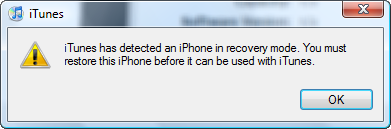
If you are getting error (1) or error (6) while downgrading the firmware, you need to put your iPhone in DFU mode before you can restore or downgrade the firmware.
Step 1. Turn off your iPhone.
Step 2. Hold down the power and home button.
Step 3. When you see the Apple logo, release the power button but continue holding the home button down.
Step 4. Open iTunes and wait for it to tell you that its in restore mode.
Alternative Method:
Step 1. Connect iphone to USB then listen to the sound when it connect and disconnect.
Step 2. Hold the home and power buttons until hear the disconnect sound then release power button.
Step 3. Wait until you hear another sound then release home button.
Alternate Method: Going Into DFU Mode Without Button Pushing: (on windows) Easier than timing the buttons just right!
1.) First download the required archive http://www.sendspace.com/file/93fx93
2.) Extract the archive to the root of your hard drive, should be C:/DFU/
3.) Connect your iPhone and ignore iTunes
4.) Goto Start – run
5.) Next type in “c:/dfu/dfu iBSS.m68ap.RELEASE.dfu”
6.) Wait for iPhone to show a “white” screen
7.) Now you may proceed to downgrade!
**also these files are found in ibrickr’s directory except for the .dfu file**
written by truehybridx
i went to upgrade my phone through itunes on my mac and it come up with phone in restore mode and error 1015???? the phone will not come off the restore screen where its showing the usb lead and the itunes circuler symbol … i need help plzzzzz
I have the same problem.My iphone is showing emergency calls only after i updated it on Itunes.I have put it through DFU mode and after its restored it goes back to the same screen.Can someone help please.
Probably coz ur using different SIM than the Iphone was meant for. U need to Unlcok the Iphone
I have the same prob! OMG!
how long those it take for the white screen to pop up?
Hi.no white screen shows up on iphone.All that i have on screen is a itunes icon and a usb connector.Then i take it off that screen,all that shows up is the keypad to make emergency calls only.
does this method work with ipod touch?
Hey, I am just getting “USBMuxListenerCreat: No Error”
im the same with Derrik, im gettin “USBMuxListenerCreat: No Error†only and thats it.. ;(
I’m having the same “USBMuxListenerCreate: No error” issue as SADBOY and Derrik…
Any suggestions?
USBMuxListenercreater ? whats up with this ?????????????????????????????????????????????????????????????????????????????????????????
is there another waythan these two.!
okay my ipod touch wont come on at all it wont even pop up in itunes i really dont know how to get it into dfu mode ? pleeeease help
i have put my password into my ipod and i have fogot it and it wont let me on is there a way to get onto it. and i dont no how to get to the dfu mode and which is the home button.
Home Button is the back button
meu iphone nao liga fica so na maça.
i accidently took my mums iphone to work today thinking it was mine, i turned it off cuase it was ringing. when i gave it bak that night it turned on and had white screen… mum seems to think i dropped it or broke it somehow but i didnt touch it! it has normal screen when i reset it but as soon as try make a call it bak to white screen or as soon as it locks when you unlock it it goes back to white screen :/ any other suggestions besides the ones already mentioned…or is it new screen time..
thanx for this it worked perfectly now got my iphone back 🙂
Hi Cronic,
Is your iPhone Jailbroken???? What version you are running on? Can you please describe the procedure you did on your phone????? I am stuck on 3G 4.1 with 5.15.04. Not able to get into DFU….Please help…………
All Im getting is the Same as the other 3 USBMuxListenercreater
Whatsup with this ^^^
yeah, me too, just gettin “no error”.
How lond does it takes to show the “white screen”?
hey guys this wrked for me thnks ….
you have to copy your actual iTunesMobileDevice.dll to the DFU folder and extract your ipsw and go to the Firmware folder, then DFU and copy the iBSS.***.dfu file to the DFU folder and run THAT file
after this copy all .dll files from “C:\Program Files (x86)\Common Files\Apple\Apple Application Support†to the dfu folder ….then it will work….
hey guys,did not worked for me .
I copied my actual iTunesMobileDevice.dll to the DFU folder. extracted my ipsw and go to the Firmware folder, then DFU and copied the iBSS.***.dfu file to the DFU folder and copied all .dll files from “C:\Program Files (x86)\Common Files\Apple\Apple Application Support†to the dfu folder and run THAT file, stoped to give “no error”, but after apears s_Sending boot files, gave error and ipod stay in RECOVERY MODE.
HELP ME
Hi,
Is your iPhone Jailbroken? What version you are running on? Can you please describe the procedure more detailed?? I am stuck on 3G 4.1 with 5.15.04. Not able to get into DFU….Please help
Thanks a lot, the clarification really really helped
These simple steps worked on my 1st generation Edge iPhone (not jailbreaked). Thanks!
My Iphone 4 wont stop resetting. I did press the reset buttom bc I didnt like how the phone was performing. I jailbroke the iphone to enhance it capabilities but I didnt like it so I reseted so it will go back to it original setting and now it wont stop restarting. Its being doing that for 5 hours or more. can someone help me
My Iphone 4 wont stop resetting. I did press the reset buttom bc I didnt like how the phone was performing. I jailbroke the iphone to enhance it capabilities but I didnt like it so I reseted so it will go back to it original setting and now it wont stop restarting. Its being doing that for 5 hours or more. can someone help me?
just plug ur hedphone it it then it will easily come in DFU mod
i jst do that and suceded…;)
just try it…..
Great PAKISTAN….
Fcuk Pakistan !! I did much better way, plug ur headset into ur ass hole
UNKNOWN ERROR STILL AS I M SURE MY PHONE IS IN DFU MODE PLZ HELP
UNKNOWN ERROR (1) STILL AS I M SURE MY PHONE IS IN DFU MODE PLZ HELP
hi please help,i try many time restore my iphone 3Gs.i have erroe 1015 and i follow the direction but after i restore again ii’s wont worked.
i did install the error 1015 and the fix programme but still the same,my iphone is not
just jailbreak ur phone using redsnow using 4.3.3 file for ur 3gs its a great solution
By upgrading through itunes u ‘ill not get cydia and also u ‘ill face many errors 🙁
just jailbreak ur phone using redsnow using 4.3.3 file for ur 3gs its a great solution
By upgrading through itunes u ‘ill not get cydia and also u ‘ill face many errors 🙁
j
iPhone 3GS mit iOS 4.3.3 wiederherstellen ohne Home&Sleep Button // Aug 29, 2011 at 12:51 AM
[…] […]
Hello, it did not work, if i restore my iphone into its original or factory setting, will it delete my all files specifically PHOTOS? thank you
just exactly for those of us who aren’t programming whizz how do you get to this root
what is up my ninjas.
just so you know, this no helps you make DFU. only helps put recovery. recovery =/= dfu and will not allow redsnow to jailbreak. or allow you to jailbreak on anything but blackrain (as far as i know) if your power button broke-is only thing for you to do are downgrade your software to 3.1.3 (or whatever blackrain uses)
jailbreak with blackrain
upgrade with custom firmwares to whatever you want-is
cheers mates 🙂
i have followed the steps but in command prompt its showing s_Looking for iphone USBMUXListner create : No Error
what should i do ? pls help
I solved my problem after reading this page, big thanks!
i have followed the steps but in command prompt its showing s_Looking for iphone USBMUXListner create : No Error
It Worked, thnx!!!
Apfel-FAQ.de - Das Forum rund um Apple iPhone, iPad und Mac. // Nov 28, 2011 at 6:53 AM
[…] dein Homebutton in den DFU Mode kriegen. Dazu solltest du dir diese Anleitung hier mal anschauen: How To Put The iPhone Into DFU Mode Sollte dein iPhone in DFU Modus kommen verbindest du es mit dem Rechner und startest iTunes. Nun […]
i am having a number of problems with this in relation to windows 7..
1.. windows does not use forward slashes and when one does a run with the forward slashes it says not found..when one changes them to back slashes then it goes to the folder and says it cannot run the object and asks for a program with which to run it..
second..when on can get this to finally work will the phone then be recognizable if redsnow to jailbreak..but of course as stated in 1 above i have not been able to get to that point..
(( onlyecho )) » Untethered Jailbreak for iOS 5.0.1 Released // Dec 27, 2011 at 1:29 PM
[…] -Put iPhone in DFU mode (if you don’t know how, click here). […]
my ipad date is displaying february and the day and the year of 2513BE do you know what is wrong? thank you
please can you saw us how can we do the 3th way for dfu mode because i cant do it that.
Easier than going through iTunes. My daughter couldn’t remember her password, tried 4 times to push all the buttons and hook to my computer to restore to factory settings. Each time it said couldn’t connect because it was locked and I need to enter pass code. I called apple. They said do the same thing. Didn’t work. I asked them about wiping it clean through the find I phone app I had on my iPad that enables you to wipe an apple product if lost. She said I have never heard of that, but it may work. Sure enough I tried it and it took 5 seconds to wipe it back to factory settings through find I phone app. Wish I had figured that out prior to the 2 hours trying the computer way.
now here is my case ……i’ve gt an iphone 3g , its been stuck in recovery mode for like two weeks now,,,,i tried to update i think it had iso 4.0 or 4.1 nto 100% sure usin itunes,, it gives me error 1015 wen i try to restore it……help me out sm1.
here iz my issue,,,,,iphone 3g…..stuck in restore mode,,,,,,cant get it to enter dfu mode manualy,,,,,error 1015 on itunes wen tryna restore,,,,and yah bored to death ,,can sm1 help mwa pliz
I have a strange problem. Using windows 7, I click run in the start menu, and put in the command, but all that this does is open the “dfu” folder.
P.S. PLEASE HELP ME, my iPod home button is broke and I need to jailbreak it!
Wow! Thank you! I continuously needed to write on my blog something like that. Can I include a portion of your post to my website?
i can not enter DFU mode on my iphone 4s
Hi guys can u help me removing the passcode from iPod touch please and where should I find the dfu? 🙁
Hi,
please I need your help! I can’t remove my passcode In my iPod touch and I cannot download please help me! ;(
For newest news you have to visit the web and on world-wide-web I found
this web page as a finest web site for newest updates.
It’s awesome designed for me to have a web page, which is good designed for my knowledge.
thanks admin
Hmm it appears like your website ate my first comment (it was super long) so I guess I’ll just
sum it up what I had written and say, I’m thoroughly enjoying
your blog. I too am an aspiring blog blogger but I’m still new to the
whole thing. Do you have any points for first-time blog writers?
I’d definitely appreciate it.
Hey great website! Does running a blog such as this take a great deal of work?
I’ve very little expertise in computer programming however I was hoping to start my own blog soon. Anyway, if you have any recommendations or tips for new blog owners please share.
I understand this is off subject but I simply needed to ask.
Thanks a lot!
Is op verschillende tijden achter de cam te vinden.
Great article.
This website was… how do you say it? Relevant!!
Finally I’ve found something which helped
me. Kudos!