
Shop WirelessEmporium.com Today!
Limited Edition iPhone header image

How To Put The iPhone Into DFU Mode

December 5th, 2007 by Limited Edition iPhone · 109 Comments

iPhone DFU Mode

If you are getting error (1) or error (6) while downgrading the firmware, you need to put your iPhone in DFU mode before you can restore or downgrade the firmware.

Step 1. Turn off your iPhone.

Step 2. Hold down the power and home button.

Step 3. When you see the Apple logo, release the power button but continue holding the home button down.

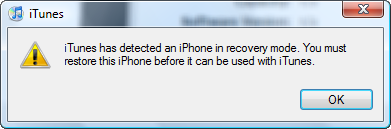
Step 4. Open iTunes and wait for it to tell you that its in restore mode.

Alternative Method:

Step 1. Connect iphone to USB then listen to the sound when it connect and disconnect.

Step 2. Hold the home and power buttons until hear the disconnect sound then release power button.

Step 3. Wait until you hear another sound then release home button.

Alternate Method:  Going Into DFU Mode Without Button Pushing: (on windows) Easier than timing the buttons just right!

1.) First download the required archive http://www.sendspace.com/file/93fx93

2.) Extract the archive to the root of your hard drive, should be C:/DFU/

3.) Connect your iPhone and ignore iTunes

4.) Goto Start – run

5.) Next type in “c:/dfu/dfu iBSS.m68ap.RELEASE.dfu”

6.) Wait for iPhone to show a “white” screen

7.) Now you may proceed to downgrade!

**also these files are found in ibrickr’s directory except for the .dfu file**

written by truehybridx

Tags: Apple · FAQ · iPhone

109 responses so far ↓

  • 1 swissdude // Dec 8, 2007 at 12:53 pm

    If I want to restore from 1.1.2, do I have to jailbreak and unlock again?

  • 2 Limited Edition iPhone // Dec 8, 2007 at 1:07 pm

    you will need to restore to 1.1.1 jailbreakme.com. Run oktoprep and update to 1.1.2. You will not news to unlock again as your 1.1.2 baseband is already unlocked and stays unlocked if you downgrade. Then you will ha e to run the 1.1.2 jailbreak again

  • 3 swissdude // Dec 8, 2007 at 1:51 pm

    okay, and i noticed that you added a rogers carrier logo in Installer. I installed it, went in Customize, selected the rogers logo but I still see the original logo in the top left corner

  • 4 truehybridx // Dec 8, 2007 at 2:04 pm

    hey good one but has anyone had any touble with the timing and combination?

    if anyone wants i can make a tut on how to put the iphone in dfu mode through iphoneinterface

  • 5 swissdude // Dec 8, 2007 at 2:34 pm

    would you have a link to download iphone 1.1.1 frimware so i can restore to 1.1.1 ?

  • 6 truehybridx // Dec 8, 2007 at 2:53 pm

    sure but sorry its not a direct link..

    iphone.unlock.com use the table at the left to find it

  • 7 GUIDE: Downgrade 1.1.2 To 1.1.1 On Windows // Dec 12, 2007 at 9:57 am

    [...] iPhone with 1.1.1 and have not yet downgraded your baseband then you iPhone will restart back into DFU mode Please follow the guide bellow to downgrade your iPhone’s firmware from 1.1.2 to 1.1.1.1. Put [...]

  • 8 GUIDE: Downgrade 1.1.2 To 1.1.1 On Windows | Iphonerz.net // Dec 17, 2007 at 9:14 am

    [...] iPhone with 1.1.1 and have not yet downgraded your baseband then you iPhone will restart back into DFU mode Please follow the guide bellow to downgrade your iPhone’s firmware from 1.1.2 to 1.1.1. [...]

  • 9 dax666 // Feb 1, 2008 at 3:07 pm

    Hello,
    My iphone is blocked. Is show only the conection cable and the sign for itunes. is no more start up, request activation. i try with restart and other stuff, but is still locked.
    Version of soft is 1.1.3.
    please help me to fix it.

  • 10 Limited Edition iPhone // Feb 1, 2008 at 7:29 pm

    this is a known issue with 1.1.3 and thats why I am downgrading. Use ibrickr I’d independence to boot the phone.

  • 11 dax666 // Feb 3, 2008 at 10:47 am

    Hello,
    i use al the stuff to start the phone, but is still in 1.1.3 firmware blocked. when i made the downgrade, the installation is stop . error 1.
    i don know what to do

  • 12 joaquim // Feb 7, 2008 at 4:44 pm

    Hi,
    Use mode Going Into DFU Mode Without Button Pushing has written by truehybridx
    See U

  • 13 llams 22 // Feb 8, 2008 at 2:22 pm

    Hi, I have done all the types of DFU modes, timing, connecting and disconnecting, Without Button Puhing, etc. And when I’m downgrading I still get the error 1 in iTunes… NEED LOTS OF HELP!!!

  • 14 llams 22 // Feb 8, 2008 at 2:23 pm

    UPDATE

    also, did it with itunes 7.6, 7.5, 7.4.3, 7.4 and nothing

  • 15 jopie // Feb 16, 2008 at 10:17 am

    same here… anybody?

  • 16 raag // Feb 22, 2008 at 2:10 pm

    I bricked my IPhone, now when I am connecting the USB cable to it, Itunes gives me error message that “This IPhone cannot be used because the required software is not installed. Run the installer to remove I tunes and then install I tunes again.” when I look into my IPhone general settings> about there is nothing in IMEI, ICCID, Modem Firmware fields. Also when I turn on my IPhone it gives me error message that can not receive and make calls call apple tech support.
    Any suggestion please.

  • 17 iXamarantech // Feb 28, 2008 at 12:40 am

    RAAG, upgrade your iphone to 1.1.3 by holding the power button and the home button until you get the itunes logo and the cable restore to 1.1.3 if it works your are done if not
    GOOD LUCK

  • 18 XerroR // Mar 7, 2008 at 5:55 pm

    Hi Dear guys
    How can i Enter DFU-MODE With Mac ? It’s All For Windows :)

  • 19 Limited Edition iPhone // Mar 8, 2008 at 11:20 am

    just push the buttons.

  • 20 bravestdawg // Mar 18, 2008 at 5:44 pm

    wow….thank god for dfu mode…..my iphone gave me the message “your iphone appears to be damaged, please take it to your nearest apple store” or something like that…..but this saved it!!! awesome

  • 21 XerroR // Mar 19, 2008 at 2:47 pm

    thanks guys

  • 22 ipod touch // May 7, 2008 at 1:53 pm

    finally, a working solution to the stupid ipod problem. THX truehybridx

  • 23 sunny // Jun 18, 2008 at 7:09 am

    my iphone 1.1.1.4 is in restore mode when i connct it to latest itunes it doesnt show any restore or update option so please help me what to do???

  • 24 luis calderon // Jun 22, 2008 at 5:53 pm

    hola amigos tengo un grave problema estaba desbloqueando mi ipod touch con zipphone pero abri otro archivo que no era el que es para desbloquiarlo abir el que dice activacion zipphone y entro al sistema operativo de mi opod touch de 16gb esta en la version 1.1.4 y ahora que lo quiero encender me sale en la pantalla un monton de letras blancas con fondo negro y la computadora no lo reconoce necesito ayuda

  • 25 Cum sa pui iPhone-ul in modul DFU | Help Desk Officer // Jul 10, 2008 at 9:59 am

    [...] (sursa) [...]

  • 26 iPhone obrukbar efter ZiPhone - iPhoneinfo.se - iPhone forum i Sverige // Jul 11, 2008 at 10:32 pm

    [...] iTunes. Den bör hitta din telefon. Annars provar du att sätta din iPhone i DFU-mode, Instruktioner: How To Put The iPhone Into DFU Mode När iTunes har hittat din iPhone så återställer du den och sedan låser upp med iLiberty+ [...]

  • 27 Matt // Jul 12, 2008 at 2:47 pm

    BIG PROBLEM
    i have 1.1.2OTB and have flashed BB to 3.9 when i unlocked with ziphone couple months ago but when i went to unlock again with ziphone it got stuck on entering recovery mode so i killed it and tried to downgrade to 1.1.4 by installing itunes 7.5 but still got error 20 and now i dont no what to do.
    HELP PLEASE

  • 28 saneesh // Jul 16, 2008 at 8:33 am

    I have updated my iphone form 1.1.4 to ver.2.Now it is again blocked. Any way to unlock it again. what should i do? pls help me. HELP ME……….PLZ

  • 29 vad menas med (DFU) läge?? - iPhoneinfo.se - iPhoneforum i Sverige // Jul 17, 2008 at 3:01 pm

    [...] "If you are getting error (1) or error (6) while downgrading the firmware, you need to put your iPhone in DFU mode before you can restore or downgrade the firmware." första google träffen på sökningen "DFU iphone" How To Put The iPhone Into DFU Mode [...]

  • 30 Smokey // Jul 20, 2008 at 9:16 am

    thank you so much!! I had tried to jailbreak my iPod and it failed… couldn’t get my system to recognize the it… this allowed me to restore it!

  • 31 borja010 // Jul 23, 2008 at 10:16 pm

    I used the DFU Mode Without Button Pushing, and my iphone get and image and cant get out of there, its the itunes icon and usb cable, how I do to resolve this

  • 32 » Unlock or Jailbreak your iPhone with WinPwn 2.0 - iPhone World // Jul 24, 2008 at 9:30 am

    [...] Restart iPhone into DFU mode. [...]

  • 33 IBRICK // Jul 25, 2008 at 10:15 am

    THE METHOD OF DFU MODE WITHOUT PUSHING MODE, IS A WASTE OF TIME AND MONEY FOR THAT METHOD, IBRCK, ZIPHONE, ILIBERTY, IDEMOCRACY, WINPWN DONT RECOGNIZE MY IPHONE, ITS IN RECOVERY MODE, JUST ITUNES RECOGNIZE AND I CANT USE MY IPHONE ITS AND IBRICK JUST FOR READ THIS CRAP PAGE

  • 34 How do i put my iPhone into dfu mode?!?!?!?! without a sleep wake button - iPhone Forums at ModMyiFone.com - iPhone | iPod Touch, news, apps, themes. // Jul 25, 2008 at 8:29 pm

    [...] a “white” screen 7.) Now you may proceed to downgrade! I found this tutorial from: How To Put The iPhone Into DFU Mode Please post back to confirm whether or not this worked out for you. Thanks! [...]

  • 35 iphone_nu_b // Jul 29, 2008 at 1:19 pm

    can’;t put iphone 2G 2.0 to DFU mode
    tried everything, as listed instuctions in the various blogs, 1000 times , plzzz any alternative solution to put that Dam** thing into DFU mode

    people with the genius ability i ask you fo help
    people with extraordinary brain i ask you fo help

  • 36 DFU - Pagina 2 - iPhone Forum - alles over de Apple iPhone en iPhone 3G // Jul 30, 2008 at 12:30 pm

    [...] naar 2.0 is geupdate, ik krijg deze echter niet in DFU mode. Ook niet via het programmatje deze pagina. Kan het zijn dat dit bij fw2.0 op een andere manier moet? Het is trouwens een [...]

  • 37 wie kan mijn iphone fixen? - iPhone Forum - alles over de Apple iPhone en iPhone 3G // Jul 30, 2008 at 12:40 pm

    [...] een vergelijkbaar probleem, ik heb iTunes 7.5 maar ik krijg mijn iphone niet in DFU mode, ik heb deze pagina gevolgd. Itunes herkend hem bij het inpluggen wel als zijnde in restore mode. Iemand een [...]

  • 38 DFU - Pagina 3 - iPhone Forum - alles over de Apple iPhone en iPhone 3G // Jul 30, 2008 at 12:40 pm

    [...] naar 2.0 is geupdate, ik krijg deze echter niet in DFU mode. Ook niet via het programmatje deze pagina. ( die blijft hangen bij: "s_Looking for iPhone" ) Kan het zijn dat dit bij fw2.0 [...]

  • 39 Cum sa pui iPhone-ul in modul DFU | iPhone Help Desk // Aug 1, 2008 at 2:40 pm

    [...] (sursa) [...]

  • 40 koerdos // Aug 3, 2008 at 7:58 am

    I need help !

    im stuck with my iphone for near a month now.
    i cant downgrade in any ways.
    ziphone or ibrickr wont jailbreak it.
    and itunes 7.7 works fine, but lower version
    wont even notice my iphone attached to the pc.
    i would love some help with my iphone
    i dont even know what my firmware is.

    i did all the tutorials i could find on the web
    much thanks to some one who would help me !

    thanks

  • 41 iphone_nu_b // Aug 3, 2008 at 11:09 pm

    so, i am still stuck where i can’t downgrade, it doesn’t go into dfu mode so i decided to take it to apple pretended i have no idea wat happen to the phone and blamed i on my 15 year old sis, but they asked me for the att sim, they are like ” ohh if i don;t put the sim in it want allow me to wipe out and restore the system” man i feel so so helpless

    anyone, ???? may be if anyone know how to tftp to phone and replace file???
    plzz help

  • 42 Cath Humes // Aug 6, 2008 at 11:18 am

    Thanks so much for your alternative instructions for putting the iPhone into DFU. Invaluable and I would have made a brick of my phone without it. Cheers!

  • 43 WinPwn 2.0.0.4 Out - Page 5 - iPhone Forums at ModMyiFone.com - iPhone | iPod Touch, news, apps, themes. // Aug 9, 2008 at 5:20 pm

    [...] a n00b when it comes to WinPwn Open itunes with your iphone plugged in, follow the steps here: How To Put The iPhone Into DFU Mode Once you have put your phine into the DFU mode hold the "shift" button and click on [...]

  • 44 Error 6 - Solution - iPhone Forums at ModMyiFone.com - iPhone | iPod Touch, news, apps, themes. // Aug 9, 2008 at 8:48 pm

    [...] & iTunes logo up then you are not in DFU mode. to assist with this I recommend going here: How To Put The iPhone Into DFU Mode follow the alternative method that has you download the DFU application to put your iPhone in to [...]

  • 45 Rebuilding my 32GB iPod Touch… Meet Ayumi « Lathe of Dreams // Aug 10, 2008 at 8:36 am

    [...] I custom-built a 4.5GB image in PwnageTool 2.0.2 using the iPhone 2.0.1 firmware. I then put the iPod Touch into DFU mode, Option-Clicked “Restore” from iTunes, and imaged my [...]

  • 46 A Work-in-Progress: Rebuilding Ayumi… « Lathe of Dreams // Aug 10, 2008 at 9:46 am

    [...] update. 2. Created 4.5GB image in PwnageTool 2.0.2 for use on 32GB iPod Touch known as Ayumi. 3. Put Ayumi into DFU mode, Option-Click and Restored custom image to Ayumi. 4. Synced Ayumi to PowerMac G5 for the first [...]

  • 47 please help , serious problem - iPhone Forums at ModMyiFone.com - iPhone | iPod Touch, news, apps, themes. // Aug 16, 2008 at 12:42 pm

    [...] you need to put it in dfu mode try this link How To Put The iPhone Into DFU Mode [...]

  • 48 Juli // Aug 18, 2008 at 1:00 pm

    When i am trying to restore my new firmware to my iphone suddenly my computer power is lost, from then my iphone is not going to menu or DFU mode also what i have to doo now :( :(

  • 49 alan // Aug 19, 2008 at 2:00 pm

    dude, DFU is different from Recovery Mode. Your download only puts the iphone into recovery mode. DFU mode is when you HAVE to restore the phone… (that’s how you should flash the phone if you get the error 6 with custom ipsw)

  • 50 alan // Aug 19, 2008 at 3:26 pm

    if you happen to have a 2.0 phone or 2.0.2 or 2.0.1 you need to look for the iTunesMobileDevice.dll that’s newer than the one packaged with the zip provided. the DLL file should be under c:\program files\common files\apple\mobile device support\bin . That’s the only way DFU.exe will do anything to a 2.0 iphone. Otherwise it won’t detect the iphone. Now the problem is, the tools stops half way. It says s_looking for iPhone
    it finds it, the phone restarts after posting the wheel thing… and it goes into RECOVERY MODE (the itunes icon and the usb cable).

    and then it fails on the next step (some damn error I don’t even know of) which is:
    s_Sending boot files

    So I’m guessing it’s failing. Because the screen is not simply black + itunes is able to see it.

    If I try the key sequence … it will NEVER EVER work. NO matter what I do, the damn key combo doesn’t work. I’m pissed at that, I tried it so many times … i’ve had it. Nothing will take the iphone 2.0 into DFU mode. NOTHING.

  • 51 freeboyredgo // Aug 19, 2008 at 3:30 pm

    google english global key glass

  • 52 Recovering the iPhone 3G from the White Apple Logo of Death | MostReviews.com // Sep 4, 2008 at 1:40 pm

    [...] a few searches on Google led me to this page which basically told me to put the iPhone into DFU (Device Firmware Update) mode and perform a Restore. As for putting the iPhone in DFU mode, with [...]

  • 53 Recovering the iPhone 3G from the White Apple Logo of Death | Apple News // Sep 5, 2008 at 10:21 am

    [...] a few searches on Google led me to this page which basically told me to put the iPhone into DFU (Device Firmware Update) mode and perform a Restore. As for putting the iPhone in DFU mode, with [...]

  • 54 mike // Sep 8, 2008 at 2:51 pm

    thank you so much i restored my messed up itouch THANK YOU SO MUCH !!@@!@!@!@!@!@!@!@!!!!!!!!!!

  • 55 [1.0] Pwnage Tool 2.1 verzameltopic (OSX versie) - Pagina 8 - iPhone Forum - alles over de Apple iPhone en iPhone 3G // Sep 14, 2008 at 2:45 am

    [...] 2.0. naar 2.1 gaan) -Iphone sync doen. -Itunes 8 geïnstalleerd -Micheal’s ipsw file gedownload -Iphone in DFU mode zetten. -Alt herstel doen , in Itunes 8 (en dan dus de gedownloade firmware van michael gebruiken ! [...]

  • 56 [1.0] Pwnage Tool 2.1 verzameltopic (OSX versie) - Pagina 9 - iPhone Forum - alles over de Apple iPhone en iPhone 3G // Sep 14, 2008 at 2:53 am

    [...] 2.0. naar 2.1 gaan) -Iphone sync doen. -Itunes 8 geïnstalleerd -Micheal’s ipsw file gedownload -Iphone in DFU mode zetten. -Alt herstel doen , in Itunes 8 (en dan dus de gedownloade firmware van michael gebruiken ! [...]

  • 57 Confirmed Windows update - Apple Forums | ModMyi.com | iPhone, iPod, Mac, OS X, Mods, More // Sep 15, 2008 at 3:26 pm

    [...] 2.1 Clean (Pwnage) (download torrent) – TPB STEP 2. Start your iPhone in DMF mode (Howto: How To Put The iPhone Into DFU Mode) STEP 3. Open iTunes and wait for it to tell you that its in restore mode. STEP 4. Hold down [...]

  • 58 Joeri // Sep 16, 2008 at 3:58 am

    I tried and tried and keep getting error messages. What’s worse, now my iPhone says it needs to be activated, so iTunes won’t recognize it anymore. I cannot do anything with the phone anymore. Can anyone help me out? We have no official carrier here, so can I still activate the phone somehow???

  • 59 Leopard 10.5.5 + Pwnage = error 1600? - Page 4 - Apple Forums | ModMyi.com | iPhone, iPod, Mac, OS X, Mods, More // Sep 17, 2008 at 8:15 am

    [...] NO to the question “Have your phone been Pwnaged before?” – Put the phone in DFU mode using this How To Put The iPhone Into DFU Mode rather than the Pwnage steps. i.e. you see the logos rather than a black screen – Follow all iTunes [...]

  • 60 andrae // Sep 25, 2008 at 7:12 am

    okay i have an unlocked iphone i was downloading apps onto the phone i restarted it and the apple icon is on the phone now. everywhere i go they are telling me to restore it with the new software however i know that if i place the new software onto this iphone it will lock it back up. with it having the new software i wont be able to unlock it right? cant have that happen because then i have a very expensive paper weight ha! what do i do i need a response asap plllllleeeeease help!
    thanks!

  • 61 Cannot switch iPhone back ON - MacTalk Forums // Sep 30, 2008 at 5:43 pm

    [...] it into DFU mode and do a [...]

  • 62 iPhone 3G frågor inför köp - Sidan 2 - iPhoneinfo.se - iPhoneforum i Sverige // Oct 3, 2008 at 3:23 am

    [...] Firmware Upgrade Mer info på: How To Put The iPhone Into DFU Mode __________________ Italiensk iPhone 3G 16Gb, Vit, 2.1, Tele2 Snackis + fri [...]

  • 63 Christian Bundy // Oct 12, 2008 at 1:02 pm

    Thank you for the great information. I do some supposrt at ipodtouchfans.com, and found this tutorial quick, simple, and to the point. From now on I’ll be referring stranded iPhone/iPoT users to this page.

  • 64 iPhone 3G crash when installing update, now stuck on boot screen! - Mac-Forums.com // Oct 20, 2008 at 8:10 am

    [...] You will have to go through a DFU restore. How To Put The iPhone Into DFU Mode [...]

  • 65 oscs // Oct 21, 2008 at 10:43 am

    Hi, I’ve a big problem. The power button of my iphone seems to be pushed, then I cann´t put it in the dfu mode. I have tried do it with different softwares, ziphone, winpwn, and with the iBSS.m68ap.RELEASE.dfu you suggest; but the result is the same, my iphone restart and keeps in recovery mode, obviously i cann’t try with the buttons because in the second step (release power button after 10 sec) the power button still pushed :(

    Any suggestion?

    Thanks for your help.

  • 66 kyle // Oct 29, 2008 at 5:45 pm

    ok so i have the old iphone with no sim card and i just want to use it as an ipod. i upgraded but now all it shows is the connect to itunes logo. when i do connect, it says its in recovery mode and needs to recover, but it doesnt…what do i do???

  • 67 kostas // Nov 18, 2008 at 7:25 am

    i have jailbraked my ipod touch recently but itunes won’t let me sycn it…if i put it in dfu mode will instaler be deleted ?

  • 68 Paul // Nov 20, 2008 at 10:20 pm

    I have tried and tried and NOTHING will put my iphone 2.1 into DFU mode – even the little exe software program. I have had enough of the jailbreak crap – been try for a month now and no success. Well – back to restore and standard iphone usage for me – too bloody hard to jailbreak it – waste of bloody effort and time. Good luck to those who succeeded :)

  • 69 I got an Iphone but... // Nov 21, 2008 at 9:55 am

    [...] i got it into DFU mode using the second method from THIS site. i couldnt get it to work with your method 461am. I can’t seem to figure out how to restore [...]

  • 70 Joel // Dec 4, 2008 at 7:25 pm

    THANK YOU!

    If it weren’t for your instructions on how to put my iPhone into DFU, I would have a bricked iPhone.

    I made a mistake while attempting to jailbreak my OS 2.2 iPhone and bricked it.

    Thanks to you, and recovery mode, my iPhone functions again!

  • 71 nickster // Dec 5, 2008 at 9:00 pm

    hey,

    i have a disabled iphone.

    will this (cure) the problem?

    thanks

  • 72 william // Dec 15, 2008 at 12:21 am

    MY IPHONE IS IPHONE 3G 2.0.2 FIRMWARE, And when i update to 2.2, it can not used. so i tried to restore it back to 2.0.2, but when in the half way of restoring, It shows slides for emergency because my simcard is not recognized in itunes 8.0.1 (sim card not legal).. so i can not continue restoring my iphone. what can i do so i can continue restore my iphone. do i need to restore it again *how?* and what software can i use so i can completely restore my iphone?… please help me….
    thanks,
    william

  • 73 DFU mode zonder power button????? - iPhone Forum - alles over de Apple iPhone en iPhone 3G // Dec 15, 2008 at 1:28 pm

    [...] niet uit of ik er wel/geen/of at&t sim in doe??? ik kreeg mijn iphone in recovery mode door: How To Put The iPhone Into DFU Mode en dan de 3e optie… de software methode… er staat dat je iphone in DFU gaat, maar volgens mij [...]

  • 74 faiz // Dec 16, 2008 at 10:17 pm

    yesterday i have download i democracy 3 for windows in my iphone.(may be it is not for i phone) now it is showing boot screen. & i democracy screen.(wating curser).what to do now.plz help me.

  • 75 Itunes Hittar inte - Trasig? Hjälp! - iPhoneinfo.se - iPhoneforum i Sverige // Dec 17, 2008 at 6:20 pm

    [...] the easy way. Files too large for email attachments? No problem! kollat igenom dessa länkar: How To Put The iPhone Into DFU Mode så jag tror inte det är problemet, antingen är det ett hårdvaru problem? att något gott sönder? [...]

  • 76 cwxwwwxdfvwwxwx // Dec 24, 2008 at 5:51 pm

    well, hi admin adn people nice forum indeed. how’s life? hope it’s introduce branch ;)

  • 77 Mettere l’iPhone in DFU senza premere alcun tasto (Windows) - iPhone Italia - Il blog italiano sull’Apple iPhone 3G // Dec 27, 2008 at 6:22 am

    [...] [fonte] Tags: dfu, itunes, Windows Condividi Scritto da Giuseppe. [...]

  • 78 Nick // Jan 15, 2009 at 5:04 pm

    i have an i touch and i’m trying to jail break it. When I do the methods above and put it into itunes, i try to restore it and it gives me this

    “Software for this Ipod is not currently available. Make sure you have the latest version of itunes and try again.”

    Please hellp

  • 79 Tee // Jan 30, 2009 at 4:39 pm

    Trying to get into DFU mode w/o pushing buttons. Everything goes well, but then when I go to run c:/dfu/dfu iBSS.m68ap.RELEASE.dfu, it says that Windows cannot find c:/dfu/duf
    please help! what am i doing wrong?

  • 80 Need help to jailbreak 2g iphone with 2.2.1 - QuickPWN Forums // Feb 3, 2009 at 5:52 pm

    [...] got hung up in the Apple logo loop for about 10 mins, and was stuck. Put the phone in DFU mode (How To Put The iPhone Into DFU Mode) and restored it in iTunes then ran QuickPWN 2.2.5 again paying closer attention to the timing and [...]

  • 81 sasha // Feb 4, 2009 at 5:39 pm

    my old iphone is in emergency mode andcan’t open it even if i tried to jailbreak it for so many times, pls help.. thanks..

  • 82 Edwin // Feb 7, 2009 at 11:46 pm

    i have 2.0firmware loced my home button does not work i tried to run dfu program and it did find the iphone but the problem s it did not went to a white screen but instead itunes and usb logo appeared on my iphone no white screen as described. need help here thanks a lot

  • 83 ishaan // Feb 8, 2009 at 1:39 pm

    how do you take out from dfu mod please please tell me e mail me at kishaan8@gamil.com

  • 84 me // Feb 9, 2009 at 4:27 am

    I tried the “Alternate Method: Going Into DFU Mode Without Button Pushing: (on windows) ” It just says “looking for iphone” Any ideas on how to let it find the iphone?

  • 85 Gianni Castania // Feb 16, 2009 at 1:32 am

    my ipod touch has a broken home button and need to restore what do i do is there software to go into dfu mode please

  • 86 Limited Edition iPhone // Feb 16, 2009 at 7:08 am

    just upgrade to 2.2.1 and then use quickpwn to jailbreak.

  • 87 Peter // Feb 16, 2009 at 7:39 am

    Guys i have ipod touch 2.2 2G and my version is 5G77a.Can i downgrade my version to 2.2 5g77 and after that i will jailbreak my ipod.Please help me

  • 88 Gianni Castania // Feb 20, 2009 at 3:47 am

    ok my problem is huge im stuck in bsd mode and the home button does not work what can i do is there a program for restore please help

  • 89 Gianni Castania // Feb 20, 2009 at 3:49 am

    help again my problem is bad my ipod touch is in bsd mode and home button is broke what do i do is there a video on ytube for help or a program to restore please help

  • 90 Downgrade iPhone 3g da 3.0 a 2.2.1 | Incauto Acquisto // Mar 20, 2009 at 7:43 am

    [...] Se avete problemi seguite questa Guida per mettere l’iPhone in DFU. [...]

  • 91 Surinder // Mar 23, 2009 at 6:11 am

    I locked my iphone 2g while upgrading to 2.2 to 2.2.1, screen ks showing slide for emergency and itunes showing that SIM card inserted in this iphone does not sem to be supported what shiuld i do to unlock my iphone. Surinder from India

  • 92 rhea // Mar 26, 2009 at 10:26 am

    thanks man.. step 1-4.. is WORKING :)

  • 93 Ape // Mar 29, 2009 at 2:13 am

    this doesn’t work for me:(

  • 94 Ashley // Mar 31, 2009 at 9:31 am

    My iphone was jailbroke with cydia that’s all it’s att and it just shut off on me yesterday…it says that i need to connect to computer and when i do my itunes just tells me it can’t locate the phone…uhm..im confused..someone else jailbroke it for me..do i need to connect it to thier computer so it can restore. OR what do i do…i have tried everything…

  • 95 sherlonda // Apr 10, 2009 at 9:13 pm

    surinda in india, did you every find out how to get your iphone working. my phone is doing the same with the emergency screen and usb cable and itunes screen. can you give me any advice.

  • 96 MMAN096 // Apr 15, 2009 at 8:09 pm

    Yo i got dfu by accident how do i get out of that mode help RSVP

  • 97 Tasha // Apr 17, 2009 at 3:49 pm

    What if your iPod doesn’t turn on at all?

  • 98 Armandot // Apr 30, 2009 at 9:12 am

    I have the same problem tha sherlonda and Surinda. I got stuck with jailbroken and my phone is now in emergency mode without recognizing the SIM.
    Any hint?

  • 99 Deejtran // May 2, 2009 at 9:38 pm

    Hi,
    My power button does not function and i’m also in the same boat as Armandot, Sherlonda and Surinda.
    Apparently I need to get into DFU mode.. which i’ve been unable to do.
    i’m using steps #1-#7 written by truehybridx but where he says “Wait for iPhone to show a “white†screen”.. it never does. when I do step #5 (“c:/dfu/dfu iBSS.m68ap.RELEASE.dfuâ€) it brings up the command prompt and says “s_looking for iphone” but doesn’t continue.
    I can fix the power button for $60 but since it’s said that there is an Alternate Method: Going Into DFU Mode Without Button Pushing: (on windows) Easier than timing the buttons just right!
    Has anyone have steps #1-#7 work for them? or is it just non substantiated?
    does anyone have a method that will unlock+activate a iphone 1st gen with a broken power button? please don’t make up stories.

  • 100 hey // May 5, 2009 at 8:10 pm

    To get out of DFU mode:

    “Press and hold the home and power buttons for 15 seconds, then press the power button for 2 seconds to reset the device.”

    Comes up on when trying to start QuickPwn

  • 101 Downgrading iPhone Beta 3.0 to 2.2.1 | Richard's Corner // May 11, 2009 at 8:44 am

    [...] 4. Put your phone into DFU mode (http://limitededitioniphone.com/how-to-put-the-iphone-into-dfu-mode/) [...]

  • 102 Ranil // May 11, 2009 at 9:35 am

    Hi,

    Great work Keep it up. I NEED HELP! I was able to get into DFU mode and down grade my iphone. I also managed to restore it. Now the message on my itune window is “Sim card does not seem to be supported” Please help. I live in Sri Lanka and iphones are still not officially launched.

  • 103 Mishonio // May 12, 2009 at 12:20 am

    I am in the same boat – HOME button doesn’t work on my iPod touch 1G (fw221). Haven’t tried the DFU tool on this site yet, but doesn’t seem like it works on any of the newer firmwares.

    Please advise if you find out something that works to put device in DFU mode relying on the HOME button

    Thx,
    M

  • 104 Mishonio // May 18, 2009 at 11:55 pm

    Guys, Please help out.

    HOME button doesn’t work on my iPod 2nd gen. How can I put it into DFU mode?

    Thx,
    M

  • 105 Kego2926 // May 23, 2009 at 7:02 am

    Thank you i had no phone for a day because i put a broken beta 3.0 (Not Recomended for use) i finaly fixed my phone.

    Thanks

  • 106 Het grote iPhone 3G hardware unlock topic - Pagina 87 - iPhone Forum - alles over de Apple iPhone en iPhone 3G // Jun 1, 2009 at 3:14 pm

    [...] zijn verschillende aps voor windows pc’s en mac computers kijk even naar deze link: How To Put The iPhone Into DFU Mode Hopelijk heb je er wat [...]

  • 107 phil // Jun 25, 2009 at 7:08 am

    is there a way to use the “no button” method on the 3.0 firmware? My home button is broken, so i can not get it into DFU for jailbreaking. I tried iliberty, ziphone and the other apps out there, but neither did get me to DFU. Please let me know if anyone finds a method for the 3.0 firmware that works. I am stuck here :)

  • 108 jUAN cHIA // Jun 29, 2009 at 9:49 pm

    Thank you so much…Mine complete worked!!!

  • 109 Andre // Jun 30, 2009 at 1:40 pm

    same problem for me, i have an iphone 2g with 2.2.1 firmware, the home button doesn’t work well so i cannot go in the old way, i’ve tryed to run in dos mode with the application downloaded here but if the phone is off it stay stuck looking for phone, if the phone is one the window simply flash open and then close… help please :( (

Leave a Comment