
Limited Edition iPhone header image

iPhone Touchscreen Fix: Increase Sensitivity

October 25th, 2007 by Limited Edition iPhone · 323 Comments

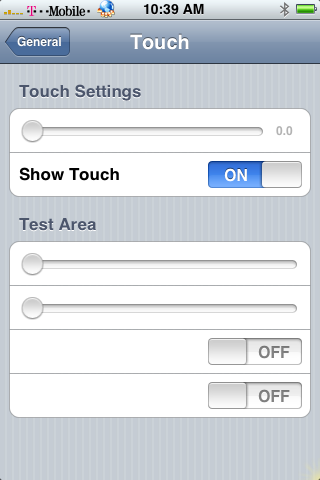
Touchscreen fix

Are you one of the many people who is having problems with your touchscreen on the iPhone? Hack you hacked your iPhone, unlocked your iPhone, or a non AT&T customer? Now that Apple’s warranty requires you to have an AT&T phone number to get your iPhone replaced or repaired, how do you fix your touchscreen problem?

There are a few options for you at the moment. You can purchase replacement parts, virginize your iPhone and try to return it, or modify your phone even more to try and fix the problem.If you are experiencing a touchscreen issue you can edit the sensitivity of your touch screen to make your iPhone more responsive. You simply need to replace your general.plist file with a modified version found here:

1.02 Firmware general.plist

1.1.1 Firmware general.plist

You will need to overwrite your general.plist located in Applications/preferences.app

The default sensitivity on the iPhone’s touchscreen is 3.5. You have the option to set it from 0-16, where 0 is the most sensitive. Recently I have had a few issues with my touchscreen and applied this modification and everything is working 10x better.

This hack may work for the majority of iPhone users, but there may be a few that will need to replace their LCD completely.

You add the code below to the General.plist:

<dict>
<key>cell</key>
<string>PSLinkCell</string>
<key>label</key>
<string>Touch</string>
</dict>

Yost edited the General.plist file, for people who have a dead strip on the top of the screen, so that the touch option is now on the bottom right under “reset” under pref>general>touch.

(take out the “.” in the link in “rapid”)

heres the link to download it if you have a upper dead strip:
http://ra.pidshare.com/files/7620461…ral.plist.html

1.0.2 firmware General.plist for low dead strip:

http://ra.pidshare.com/files/6058341…ral.plist.html

1.1.1 firmware General.plist for low dead strip:

http://ra.pidshare.com/files/6510671…ral.plist.html

Tags: Apple · Mods · iPhone

323 responses so far ↓

  • 1 AlexeyNo Gravatar // Nov 21, 2007 at 11:50 am

    Great summary.
    I had the same problem and increasing sensitivity solved it.

    Regards,
    Alex

  • 2 DaveNo Gravatar // Nov 26, 2007 at 3:11 pm

    I’m skeptical. The screenshot above looks like a fake, and I don’t see any sign of this setting in the plist. Which element is it? I’d rather edit it myself than replace the plist and overwrite every general setting.

  • 3 Limited Edition iPhoneNo Gravatar // Nov 26, 2007 at 3:21 pm

    I can confirm that this worked on 1.02 firmware. I have not tested it on 1.1.1 or 1.1.2. Download the file and compare it to your original plist. I cant remember off hand what changed.

  • 4 Limited Edition iPhoneNo Gravatar // Nov 26, 2007 at 3:53 pm

    i have updated the post with what you add to the general.plist

  • 5 iPhone NewbieNo Gravatar // Dec 6, 2007 at 11:43 pm

    the General.plist file mentioned above is a binary file on 1.1.1. What do you add extra key and values pair to the plist? It’s not ASCII file.

  • 6 Limited Edition iPhoneNo Gravatar // Dec 7, 2007 at 8:41 am

    you need to convert your file with: http://140.124.181.188/~khchung/cgi-bin/plutil.cgi

  • 7 FrankieNo Gravatar // Dec 8, 2007 at 2:45 am

    can you send general.plist modified for 1.1.2?

  • 8 Limited Edition iPhoneNo Gravatar // Dec 8, 2007 at 11:47 am

    just add the above code to your own or edit it with mobile finder and mobile text edit

  • 9 ritzmoNo Gravatar // Dec 8, 2007 at 3:47 pm

    lower half of my screen is dead so no chance to access settings. Any chance to get a plist with sensitivity preset to 0?

  • 10 Limited Edition iPhoneNo Gravatar // Dec 10, 2007 at 10:00 am

    what firmware version do you have?

  • 11 ritzmoNo Gravatar // Dec 10, 2007 at 1:47 pm

    still on 1.02

  • 12 yostNo Gravatar // Dec 16, 2007 at 8:22 pm

    Thanks for the credit to the modified version.
    Hope it helps everyone more with the upper dead strips, I know how frustrating it can be.

  • 13 taydsNo Gravatar // Dec 16, 2007 at 8:44 pm

    THATS MY NIGGA YOST KEEP IT UP BRAH

    In other words, good read.

  • 14 XymonSezNo Gravatar // Dec 17, 2007 at 5:24 am

    Can somebody post link where to download modified General.plist other than rapidshare? I think our internet is proxied and we can not download free from rapidshare. Thanks.

  • 15 Limited Edition iPhoneNo Gravatar // Dec 18, 2007 at 10:12 am

    which one do you need? and where do you want me to link it?

  • 16 XymonSezNo Gravatar // Dec 18, 2007 at 10:21 am

    I have 1.1.1 firmware and I have about 1cm dead strip about 1cm from the bottom of the screen. I can not use the rows that includes “zxcvbnm” keys on keyboard. Can you share the modified general.plist on other file server other than rapidshare (like http://www.box.net)?

  • 17 Limited Edition iPhoneNo Gravatar // Dec 18, 2007 at 2:51 pm

    http://www.box.net/shared/fvoi268osm

  • 18 James C0lvinNo Gravatar // Dec 19, 2007 at 12:01 am

    It worked because I can use the *,0,# on my keypad when dialing phone numbers. But I still have problems with typing in safari. When I tilt my phone horizontally, I can’t use the Z or D buttons. Can you help me out? I’m running 1.1.1.

  • 19 XymonSezNo Gravatar // Dec 19, 2007 at 3:22 am

    This is Great! I just saved $200 for what a local repair shop charges to replace the touch screen. I can now use all the letters on the keyboard and use the “call” button on the Phone. Many thanks to “Limited Edition iPhone”!!!

  • 20 Marco SanchezNo Gravatar // Dec 19, 2007 at 2:46 pm

    Having almost the same problem as Ritzmo, I can get into settings but can’t touch General…
    any ideas on what I can do?
    or any way to get a plist that’s preset to 0?

  • 21 Marco SanchezNo Gravatar // Dec 19, 2007 at 2:46 pm

    Having almost the same problem as Ritzmo, I can get into settings but can’t touch General…
    any ideas on what I can do?
    or any way to get a plist that’s preset to 0?

    Version 1.0.2

  • 22 josephNo Gravatar // Dec 20, 2007 at 1:57 pm

    is there a way to go even more than 0.00? like a negative number? -3???

    i noticed as the number gets lower, i get more of the screen back…

  • 23 Limited Edition iPhoneNo Gravatar // Dec 20, 2007 at 4:19 pm

    i do not think so, but you could always try

  • 24 DaveNo Gravatar // Dec 21, 2007 at 8:00 pm

    Nicely done, I stand corrected! I modified my plist manually as suggested and this works as advertised. Very cool indeed.

  • 25 MoeNo Gravatar // Dec 23, 2007 at 9:48 am

    Is there a solution for 1.1.2 ?

  • 26 Limited Edition iPhoneNo Gravatar // Dec 24, 2007 at 8:39 am

    try the manual method for 1.1.2

  • 27 hermannNo Gravatar // Dec 28, 2007 at 3:05 am

    Hi everyone first thanks for your job here.
    I have a probleme I have the top screen dead, I succeed to modify the general.plis and I can access the touch settings, but to modify the sensibility we need to access the top of the screen, wich is impossible because it’included in the in sensitive area. So is there a way to put the touch setting bar, in the bottom of the page ???

  • 28 hermannNo Gravatar // Dec 28, 2007 at 3:09 am

    For people who can’t access to the settings menu because of the dead area, you can modify the order of icons on the springboard by modifying the DisplayOrder.plist, then you will be able to chose where to place the icon on the screen.

  • 29 jaumeNo Gravatar // Jan 3, 2008 at 7:47 am

    Hi all,

    Happy 2008! I’m having the same problems as hermann. I have a probleme I have the top screen dead, I succeed to modify the general.plis and I can access the touch settings, but to modify the sensibility we need to access the top of the screen, wich is impossible because it’included in the in sensitive area. So is there a way to put the touch setting bar, in the bottom of the page ???

    Please, can anybody help? Thanks!

  • 30 jaumeNo Gravatar // Jan 3, 2008 at 8:19 am

    Hi,

    I just found a way. You just have to edit the touch.plist and add some empty cells on the top of the file so the silde bar gets positioned a bit lower where you can acces it.
    it still didn’t fix the touch screen issue for me, but was able to acces the control.

    Thanks!

  • 31 TboltNo Gravatar // Jan 5, 2008 at 10:22 am

    Hello,
    I have the same issue as jaume.
    The upper part of my touchscreen is not working anymore.
    How do you edit touch.plist file.I was able to edit the general.plist file but not th etouch file. It’s is not like xml format but in hex..??..
    Jaume,how did you do? can you send it to me?

    Best regards

  • 32 jaumeNo Gravatar // Jan 7, 2008 at 5:35 pm

    Hey Tbolt,

    I just extracted the touch.plist form the iphone using ibrickr or ssh and used the conversion tool at:
    http://140.124.181.188/~khchung/cgi-bin/plutil.cgi
    once converted to ascii you can add childs in the xml so that the original controls appear a bit lower and you can access them form the part of the touchscreen that’s working.

    In my case it didn’t help and i guess i’ll have to send my virginized iphone back to apple somehow. Please tell me if it works with yours!

    Thanks,

    Jaume

  • 33 eddyyyyyNo Gravatar // Jan 11, 2008 at 7:46 am

    hi, my iphone also encounter same problem. at the line of clock, calc, notes, settings, itunes, installer, and iworld is not responsive. other than that, it still working fine.

    I’ve accidentally replaced the 1.1.1 general.plist into my 1.1.2 general.plist by using iphonebrowser.

    the result is when i slide to 16, the touch is really less-sensitivity, but when i slide to 0, it makes no differents. Those lines mentioned still not responsive to touch.

    Any solution?

  • 34 FranciscoNo Gravatar // Jan 13, 2008 at 8:04 pm

    Thank you. I just got the problem today where bar space, . and some other very lower part of the screen didnt work and changing the sensitivity worked for me. My iPhone is out of Warranty as I did the hardware unlock.

  • 35 MitchNo Gravatar // Jan 15, 2008 at 1:46 pm

    I used it and it does make a difference.
    I could not touch the bottom row of icons.
    Now I can press iPod, Safari, etc, but it does not go down to the exact bottom of the screen.
    I still have problems when there are smaller buttons to press, like on the keyboard.

  • 36 CharlyNo Gravatar // Jan 16, 2008 at 8:23 pm

    hi guys i have the same problem with the dead strip, but mine is on the lower part i cant use the call button nor the zxcvbnm buttons, im reading this but i still dont understand what to do, can anyone please guide me step by step to fix this problem i would really aprecciate the help, thanx a lot

  • 37 sarahNo Gravatar // Jan 17, 2008 at 10:04 am

    where do i find the general.plist on my phones files?

  • 38 RobertoNo Gravatar // Jan 21, 2008 at 5:36 am

    My problem it’s serious. I can’t slide to unlock because I lost the 50% of the bottom part. It means I can’t hack to let it connect to the network and install the new general.plist. Any suggesiton?!?

  • 39 TboltNo Gravatar // Jan 22, 2008 at 7:38 am

    Thank you Jaume for your answer.

    For those who search for a general and touch.plist file, you can google these names and you will find them.
    But unfortunately it won’t help in many cases.
    I had to virginze my iphone and send it back to the us. My friend will try this week to get it replaced or repaired… I still cross my fingers…

    Touch screen issues are hardware and to fix it you need to replace the whole TS control and hardware which is not cheap…

    good luck

  • 40 nishchay5No Gravatar // Jan 26, 2008 at 9:54 am

    Hey could anyone help me,
    how to do all this stuff…

    I mean, how could I get the software for replacing that general file….

    I m using Windows

  • 41 TboltNo Gravatar // Jan 26, 2008 at 1:40 pm

    hello,
    I useiBrickr v0.91.
    You should findit easily on the web.
    It’s free, no installneeded, just run it.
    You will have a file access to you iphone….

  • 42 charliedjrNo Gravatar // Jan 27, 2008 at 11:06 am

    hello,
    inherited an iphone with this exact problem, however, it has 1.1.3, and i am only using it a an ipod at the moment, cannot use the last row of icons with the clock,calc,etc. won’t use it as a phone until this is fixed, do i have to jailbreak phone in order to try this .plist fix?

  • 43 Limited Edition iPhoneNo Gravatar // Jan 27, 2008 at 3:11 pm

    yes you need to jailbreak to access files.

  • 44 charliedjrNo Gravatar // Jan 27, 2008 at 10:10 pm

    Thanks for the quick response. There appears to be many hacks for jailbreaking iphones, which is the best or the safest ( if there is a safe way)? I suppose i should roll back my itunes and iphone to 1.1.2?
    Thanks.

  • 45 DAvieNo Gravatar // Jan 29, 2008 at 10:30 pm

    Can’t download the file for lower dead strip 1.1.1.
    Removed the “.” but it says file not found. Anywhere else I could find this file??

    Thanks!

  • 46 JamesNo Gravatar // Jan 31, 2008 at 12:22 am

    Is there any way the sensitivity can be increased without having to access the settings? As in a direct modification through USB. I ask this because i had this on my iPhone and it helped greatly but now i have restored my phone to 1.1.1 and cant access the bottom strip of the screen to get onto jailbreakme.com, and i cant access the settings because the phone isnt activated.

  • 47 CharlyNo Gravatar // Feb 2, 2008 at 10:35 am

    Guys Im dying here, i cant call, i cant text, please somebody guide me step by step on how to fix this thing i have a lower dead strip, im begging ya please im desperate. how do I acces the general plist files?????

  • 48 NohamNo Gravatar // Feb 2, 2008 at 3:51 pm

    My phones touch screen lower part died after a minor drop to the floor. Does anyone know where to get spare parts and how to change the touch item?
    The touchscreen seems to have problems also without dropping the phone, several ppls report sudden malfunctions. Thanks for your HELP.

  • 49 praveenNo Gravatar // Feb 3, 2008 at 5:17 am

    guys, i have got 1.0.2 iphone with upper half of touch screen dead. i used ibrikr 0.91 to extract touch.plst file and added few extra cells in the software and increased the sensitivity to 16. now i could use contacts and call a no . but 1 2 3 in my key pad are not working. can any body suggest how to mod the key pad and bring the numbers down to sensitive area as to make a call. also suggest how to modify the files as to bring the application buttons to the lower half of screen which is responsive?

  • 50 praveenNo Gravatar // Feb 3, 2008 at 12:14 pm

    any body suggest software modification as to bring all the controls to lower half of touchscreen

  • 51 BegemoterNo Gravatar // Feb 3, 2008 at 5:21 pm

    hat is really can change sensitivity, and depends of position number it change row to which I can not access, usually it is where is “0″ or “call” on keyboard. But I can’n do working both of them.

    1-1-1

    Some one have any instruction how this feature can be used? for what down there two switches? Need I restart iPhone after changing value of sensitivity? Any idea?

  • 52 MattNo Gravatar // Feb 6, 2008 at 2:44 pm

    This worked so good for me from 1.0.2 to 1.1.2, but I just updated to 1.1.3 (jailbroken and unlocked of course). The touch fix stayed for the most part, but it definitely isn’t as responsive as it was. The touch option is no longer available. I tried to look at the general.plist and alter it for 1.1.3 myself, but I’m not good enough. Anyone out there making a 1.1.3 compatible doc?

  • 53 CennerNo Gravatar // Feb 7, 2008 at 2:15 pm

    I also want to try upgrading to 1.1.3, but won’t try it until I know I can fix the Touch Sensitivity. Please help. =)

  • 54 BegemoterNo Gravatar // Feb 7, 2008 at 6:24 pm

    look post above! if you improved sensitivity on 1.0.2 or 1.1.1 and your iPhone is OK now Do not do it

  • 55 CennerNo Gravatar // Feb 8, 2008 at 2:32 pm

    YESSSSSS! got it working with 1.1.3! woohoo! =)

  • 56 alecNo Gravatar // Feb 14, 2008 at 5:58 pm

    how did you fix it in 1.1.3?

  • 57 andehluNo Gravatar // Feb 18, 2008 at 3:57 pm

    Yeah how did you get this working in 1.1.3? I added the lines to the plist and APD’d it over to my phone, did a hard reboot and nothing, the sensitivity slider is still at the top and I the whole strip still is not working….

    If anyone gets this working it would be lovely to know how.

  • 58 carlNo Gravatar // Feb 18, 2008 at 7:39 pm

    hi, the half bottom of my iphone is completley dead. my version is 1.1.3.my opinion is that i should downgraded it to 1.1.2 and try the p.list thing u guys are talking about it would help if you could send me the full step by step on how u can add this option on the iphone. Please its really important for me to know how to do this or else i’ll have to buy a new screen which costs 250$.So if you could provide me this information please send it to my email at kormal_655@hotmail.com thank you for all your efforts. hope to hear from you soon as it will save me 250$.

  • 59 coderecycleNo Gravatar // Feb 20, 2008 at 9:50 am

    How do i connect to the iphone to change the general file?

  • 60 jerryNo Gravatar // Feb 20, 2008 at 12:00 pm

    Hi, the lower portion (dock button area) is dead. I edited general.plist with ifuntastic and the touch option is there but it makes no difference. perhaps i shouldn’t have dropped it!

  • 61 Gaijin-PhoneNo Gravatar // Feb 20, 2008 at 3:20 pm

    My issue is a vertical non-responsive strip on the left of my screen. This means, after installing the general.phlist and getting into the “touch” setting, I cannot slide the bar below “3.0″. That’s where my non-responsive area begins.

    How can I modify this setting off-line?

  • 62 CharlyNo Gravatar // Feb 20, 2008 at 3:24 pm

    This phone is killing me!!! first I had a dead strip on the lower half of the phone, but I could still kinda use it, now the whole lower part died, and I cant even type my password, also I use windows! please somebody help me out. my msn is carlitros_30@hotmail.com

  • 63 MiharbiNo Gravatar // Feb 21, 2008 at 2:10 am

    My 1.1.1 got the sensitivity bug. I got really crazy and worried over it all day. I found this site but had no clue on how to use file. So I virginized and restored the phone. No change. Next I upgraded to 1.1.2. No change. So I dl’d WinSCP, installed BSD subsystems and OpenSSH on the iphone and got connect to the iphone. I replaced the general.plist with the 1.0.2 plist, and it goddamn works. Yay.

  • 64 TJHNo Gravatar // Feb 24, 2008 at 8:25 am

    I got exact the same problem as Gaijin-Phone meaning I can’t use the “Touch Settings” slider which means I can’t modify the senivity - is there a .plist I could change the settings below 3 manually?

  • 65 andehluNo Gravatar // Mar 2, 2008 at 7:20 am

    For the upper dead stip: i swapped the plist on 1.1.3 with the 1.1.1 version and it worked it put the touch setting under the reset it general settings. However the problem is that i still cant turn the sensitivity setting to 0 as it is still in the dead strip… dang.

  • 66 RuizloNo Gravatar // Mar 8, 2008 at 9:44 am

    Hi, I need help. My iphone has a bottom dead strip. I add the general.plst bur I can acces to General , beacuse it not comes up enough so that i could press it with the part of the screen that does work. How I can move it? Please someone let me know

  • 67 TspivNo Gravatar // Mar 8, 2008 at 12:12 pm

    I have firmware 1.1.2 and the bottom strip isnt working.. is there anyway i can increase the sensitivity?

  • 68 TspivNo Gravatar // Mar 8, 2008 at 12:12 pm

    I have firmware 1.1.2 for t mobile and the bottom strip isnt working.. is there anyway i can increase the sensitivity?

  • 69 TspivNo Gravatar // Mar 9, 2008 at 12:55 pm

    could someone please help i really dont want to have to buy the replacement screen because i dont have the money i have firmware 1.1.2 and my phone is unlocked but i have no idea what the code is or how i would go about putting it in..

  • 70 TspivNo Gravatar // Mar 9, 2008 at 12:56 pm

    could someone please help i really dont want to have to buy the replacement screen because i dont have the money i have no idea what the code is or how i would go about putting it in..

  • 71 TspivNo Gravatar // Mar 9, 2008 at 12:58 pm

    could someone please help i really dont want to have to buy the replacement screen i have no idea what the code is or how i would go about putting it in..

  • 72 BegemoterNo Gravatar // Mar 9, 2008 at 3:11 pm

    I have upgrade frpm 1-1-1 nj 1-1-4, the problem is permanent, of cource I can slightly change sencetivity but I cannot turn back to work my iPhone. Whenit happened there were two died strips, line with “7″ in the begining and “*” is well, I tryed to move sencetivity level step by step from left to right, and find two position, one was abled “7″’s row and second sometimes ables “*”. But both together was not abled.

    If you have just one dead row, this can improve situation, that all in my opinion.

  • 73 iPhone - Page 6 - ExiledGamers // Mar 16, 2008 at 8:29 am

    [...] its an unlocked one etc.. but you could virginise it and send it back if you wish. Also try here iPhone Touchscreen Fix: Increase Sensitivity might help but i think the replacement screen is the way to go. __________________ Criticalmass [...]

  • 74 DennisNo Gravatar // Mar 18, 2008 at 8:53 pm

    Hi, I have Firmware version 1.1.4

    And this whole bottom strip is dead.
    http://img186.imageshack.us/img186/7867/iphonev111springboardpasq9.jpg

    Anyway is there a way to fix this?

    And is it possible for me to downgrade to 1.1.1 and just use the general.plist option?

  • 75 JoaquinNo Gravatar // Mar 28, 2008 at 11:10 pm

    Hi,

    I have 1.1.4 as well, and the lower part just died .. i cant unlock the screen or anything. i am not too sure on how to do the general.plist thing, can anyone tell me? and also i think i need to downgrade to 1.1.1?

  • 76 AvengioNo Gravatar // Apr 1, 2008 at 11:30 pm

    I just edited the general.plist file on my 1.1.4 phone. I had a dead stripe on the left side of my phone. About less than 1cm. It now responds better. The only key that does not work is the ‘w’ on the keyboard. Thanks a bunch for the help on this.

  • 77 WengerNo Gravatar // Apr 2, 2008 at 11:25 am

    I dont know if mine is a different case, but i DROPPED my iphone and the lower half stopped working. does that mean it cant be repiard and the appel center cant replace it ?

  • 78 cheetahNo Gravatar // Apr 2, 2008 at 11:26 am

    Avengio Can you please expalin in step by step that how did u manage to do it on 1.1.4
    hanks in advance.

  • 79 AvengioNo Gravatar // Apr 2, 2008 at 12:05 pm

    Cheetah - Your phone must have the BSD subsystem installed and openSSH. Do this through Installer. SSH into your phone or use a SFTP. Your username will be root and the password is alpine. Once in find the General.plist file in the location specified above and open it with a text editor like notepad or bbedit. Do NOT use Word. Paste in:

    cell
    PSLinkCell
    label
    Touch

    In the same location as the other nodes. Power down phone, reboot and navigate to Settings>General>Touch

    You will see the above picture preference screen.

    Hope that helps.

    Incidentally for those having troubles accessing the bottom half of the screen and not being able to unlock the phone you may have some luck editing the touch.plist file in the same location as the General.plist file. Just look for 3.5 and change it to 0.

  • 80 AvengioNo Gravatar // Apr 2, 2008 at 1:12 pm

    Crap. The above post stripped out the xml snippet. Please use the one in the article above. Sorry.

  • 81 HrvojeNo Gravatar // Apr 5, 2008 at 12:27 pm

    It seems to work, but it jumped to 16 and now it is horrible. Is there any way to mannually change this setting with ssh and vi editor or etc? Or at least to reset to 3,5 again, so I can give it another try to zero?

  • 82 cheetahNo Gravatar // Apr 5, 2008 at 1:10 pm

    Is there any program like iFuntastic(mac) for windows from which i can install SSH on my iphone…i can not access settings/installer to get ssh on my iphone as that area is in my dead spot zone :S

  • 83 ZibriNo Gravatar // Apr 5, 2008 at 5:27 pm

    Or you can use this ziphone 3.0 plugin.
    Save this file in the same ziphone directory (on windows) or in the
    mac application resources directory (which should be /Applications/ZiphoneOSX.app/Contents/Resources/
    )

    Here is the plugin.

    http://rapidshare.com/files/105185077/Blucher.zip

  • 84 kennydoesitNo Gravatar // Apr 7, 2008 at 1:16 pm

    No one ever bothered to mention that the ASCII files, after being edited, have to be converted back to .plist (1.1.1+).

    What do we use to convert back to the original files for the iPhone to recognize?

  • 85 siliconeagleNo Gravatar // Apr 7, 2008 at 2:22 pm

    I tried thiis fix and with the 1.1.4 firmware and my iphone just constanlyly reboots - has anyone had the same issue?

  • 86 kennydoesitNo Gravatar // Apr 7, 2008 at 2:24 pm

    In Touch.plist, I was able to take the value down to -15.0 (it takes real numbers) and now I have control over the lower keys.

    I dont know how long it’ll last, so I’m prepping up the $200 to have a techpro do the digitizer/screen thing.

    I love my iPhone.

  • 87 siliconeagleNo Gravatar // Apr 7, 2008 at 2:25 pm

    I tried thiis fix and with the 1.1.4 firmware and my iphone just constanly reboots - has anyone had the same issue?

  • 88 cheetahNo Gravatar // Apr 7, 2008 at 2:33 pm

    kennydoesit …How did you reload the plist to iphone? as when i amend it ..its an ASCII file.. and i think my iphone does not read ASCII files… as u mentioned in ur last post… you have to convert them back to plist/binary files…. how did you do that…can u explain..thanks..

    fahhadjavaid@hotmail.com

  • 89 cody01414No Gravatar // Apr 9, 2008 at 10:03 am

    Hi i just recentley purchased an iphone and im in love with it, i have version 1.1.4 installed and just unlocked it using ziphone 2.5 the only thign is there is a dead spot on my screen ..on my home screen the itunes,ziphone icon and the installer dont work, awell when i go into phone the #,*, nor zero will work so i tried downloading the other general list but my computer says windows cannot find a program to open and it asks me to browse for a program …can anyone help me and explain it in the easiest way possible , step by step my email is lambolover700@hotmail.com

    thanx

  • 90 mikeNo Gravatar // Apr 12, 2008 at 1:11 am

    kennydoesit CAN you please post your .plist file it will help a lot of people with the same problem.
    thanks.

  • 91 JoeNo Gravatar // Apr 12, 2008 at 1:45 pm

    Wow! This works GREAT on my 1.1.4 firmware!!! I was about to use my warranty and get a replacement. I had a dead strip at the bottom of the screen that wouldn’t allow me to use the full keyboard or SMS, etc. I simply SSH’s into the preferences.app directory on the iPhone and copied the general.plist file to my desktop. Since I’m on a PC, I had to run an XML convert on the plist file which found a website that does the conversion, otherwise text editors will just show garbage text. From there I opened the new converted plist file in wordpad. I added the text you posted into the plist file and resaved it. I then copied the file back to the original location on the iPhone overwriting the old general.plist file. No need to do any kind of xml conversion again. I then was able to access the touch sensitivy screen under > settings > general > touch. I set it all the way to zero and I now have full use of my phone back! I do have to press a little harder down towards the bottom of the screen though. Hey, but at least it works!

  • 92 JoeNo Gravatar // Apr 12, 2008 at 1:51 pm

    Oh one more thing … isn’t it possible to add this functionality of accessing the touch menu as a source in installer.app? It’s a simple thing that seems like someone could make a tweak for and it sure would be helpful to a LOT of people.

  • 93 andehluNo Gravatar // Apr 13, 2008 at 4:51 am

    An installer is a great idea. Does no one have this problem with a TOP dead strip? I can get the Touch slider to appear in my settings but the actual slider itself IS IN MY DEAD STRIP ARGH! ;) Is there anyway to control the sensitivity value itself thru the plist?

  • 94 AvengioNo Gravatar // Apr 13, 2008 at 10:13 am

    @andehlu - you could ssh into the phone and edit the touch.plist file. It is in the same directory as the General.plist. Good luck! Hope that helps.

  • 95 andehluNo Gravatar // Apr 13, 2008 at 10:45 am

    @avengio - thanks I couldnt get the default to zero in the Touch.plist BUT what I did do is add a bunch test sliders on top and bottom of the slider that controls the sensitivity. This allowed me to vertically scroll the slider out of my dead strip. I set it to zero and BUMMER. It still doesnt work. I think I have a real screen issue. Oh well Ill live with it until the new phone comes out (hopefully) soon. Thanks for your help.

  • 96 kennydoesitNo Gravatar // Apr 15, 2008 at 2:32 pm

    I still have dead spots on my screen. I use WinSCP to transfer files to and from the phone.

    I’m also using a 3rd party dialer (to pull up my contacts and to add new numbers).

    Anyone know where the settings for the subMenus (favorites, Recents, Contacts, etc) might be?

    I still can’t get those to respond to touch.

  • 97 DavidNo Gravatar // Apr 22, 2008 at 11:25 pm

    Hey can someone post their modified general.plist file for firmware 1.1.4? My touchscreen is having same problems :-(

  • 98 JanimalNo Gravatar // Apr 23, 2008 at 9:49 am

    Hi,

    I have a problem also. My lower half of touch screen is not working and i can’t reach General from settings. What can i do? I can go to iphone via ssh. Can i change the order of applications in settings, so that genral could be a bit higher in the screen…. PLEASE HELP i dont want to use my NOKIA!!!!!!

  • 99 MikeNo Gravatar // Apr 23, 2008 at 7:39 pm

    here is the 1.1.4 modified file the touch sensor can go up to -15 instead of zero.

    its working great thanks guy for the info you are providing here.

    those 2 files needed to make the sentivity option appear and the second is to let us go under zero.

    mine is working A+ with -15 but i have to touch above the letter.

    but its working.

    give it a try and let me know.
    here are the links.
    http://www.mediafire.com/?funnc1xrcvm

    touch.plist link:
    http://www.mediafire.com/?qhdaly3hgyf

  • 100 kuczaNo Gravatar // Apr 25, 2008 at 6:39 am

    Hi!

    Here are the modified files for 1.1.4!

    Just upload them to your phone!

    http://rapidshare.com/files/110285879/General.plist.html
    http://rapidshare.com/files/110286136/Touch.plist.html

    The touch.plist is modified so the sensitity slider is located in the middle of the screen. hopefully acessible for most people… I have added test areas both at top and buttom screen…

    Good luck!

  • 101 JanimalNo Gravatar // Apr 25, 2008 at 12:45 pm

    Ok I’ve done it. I cant reach general in settings area, so I cant try to change touch senstivity. If wallpaper and general could switch places i could reach general. before that it inpossible. Or should i try to change the source of touch.plist from 3.5 to 0?

  • 102 JanimalNo Gravatar // Apr 25, 2008 at 12:54 pm

    For clearance i downloaded those files and uploaded to phone via ssh but the situation is the same as mentioned above

  • 103 CostasNo Gravatar // Apr 25, 2008 at 7:32 pm

    Hi, i have 1.1.4 firmware and the upper dead strip prob,i have the 2 modified files but i can’t upload them because i had used Ziphone to unlock and iBricks doesn’t works ,it needs (ziphone ibrickr fix) to be downloaded and i can’t add Sources. I can’t neither use the sshkit(with WinSCP)because you must power off during the procedure. . What can i do?

  • 104 MikeNo Gravatar // Apr 25, 2008 at 9:36 pm

    Costas: you can use winscp google it and use it
    login to your iphone as login: root
    pass: alpine.

  • 105 DavidNo Gravatar // Apr 26, 2008 at 4:31 am

    Thanks for the file guys, how do I go to -15? It seems to go only to 0.0

  • 106 CostasNo Gravatar // Apr 26, 2008 at 9:25 am

    Mike: i have try it but i can’t select the wifi network from my iphone because is under the dead strip,so i can’t connect it….any other solution to transfer the files..?

  • 107 CostasNo Gravatar // Apr 26, 2008 at 12:30 pm

    Happy Easter!! everyone.. i think i have made it with a mac and megaphone but i still don’t know where to copy the 2 files ..There is -DCIM -Downloads etc…the only .plist file i see is Servises.plist but no General.plist is there to be replaced..??

  • 108 kuczaNo Gravatar // Apr 27, 2008 at 11:35 am

    Your phone has to be jailbroken! Then copy the 2 files to “Applications -> Prefrences” folder…

    Dont think it goes to -15.. But you can try.. Edit the touch.plist with Wordpad… Its at the top…

  • 109 CharlesNo Gravatar // Apr 28, 2008 at 10:16 pm

    just installed ziphone 3.0, need to fix deadspot around lower spot on the screen, how do i ssh into phone and install above fixes in iphone, sorry guys, just a newbie.
    Thanks.

  • 110 kennydoesitNo Gravatar // Apr 30, 2008 at 3:24 am

    Scroll back through the replies above. There is a wealth of info up there.

  • 111 kashNo Gravatar // May 6, 2008 at 12:31 am

    I need to know how i i am gonna put files in iphone cause i edit plist put how i gonna install in iphone i have 1.1.4 ver please help me kinda new

  • 112 AfonsoNo Gravatar // May 6, 2008 at 1:20 pm

    I’m trying to change my general.plisf file but I can’t convert it from xml.. Any recommended software? I’m using winscp to read the files.
    Thank u!

  • 113 AfonsoNo Gravatar // May 6, 2008 at 3:05 pm

    I was able to transfer the general.plist file and the touch.plist file, but still not working… I’ll keep on pimp my iphone! Good luck for everyone.

  • 114 kashNo Gravatar // May 6, 2008 at 9:23 pm

    Afonso

    How did ya manage transfer files into ipod cause i can’t transfar which program i should use cause i can’t use wincsp cause i don’t know how to use can you give me step by setp how to transfar files cause i allready mode Plist

    thanks in advance

  • 115 AfonsoNo Gravatar // May 7, 2008 at 5:56 am

    Kash,
    I used winscp ( can download it searching google)to switch general.plist file and touch.plist. don´t know other way… try to consult other foruns. Good luck!

  • 116 RobertoNo Gravatar // May 14, 2008 at 3:04 pm

    Guys, finally I found how to modify the value of the Touch: /private/var/mobile/Library/Preferences/com.apple.springboard.plist

    The value to put is “SBFingerProjection”.

    You can add the following section using something such iBrickr:

    SBFingerProjection
    -10

    Hope this helps.

  • 117 Chris