
UPDATE 3: I have fixed the fixed the first link. I will see what is going on with the second, it just re-routes you to one of my posts, don’t use it.
UPDATE 2: Alright everyone, this is important. I have created a signed Mobile Configuration file and have also made a signed .ipcc file for all of you on AT&T. Enjoy!
Carrier Update, download, then apply in iTunes. This is exclusively for AT&T GoPhone customers
Mobile Configuration Profile, just open the Link in Safari by taping here, then install.
If the mobile configuration file I made doesn’t install right away, try my .ipcc. Also, tell me about any issues you may encounter and I will try to see what’s up.
Also, if you have any other carrier that isn’t AT&T, then continue using the external website I provided. Enjoy!
(These downloads are exclusively from Limited Edition iPhone, do not redistribute without permission, and only link to this page or to the file itself.)
UPDATE 1: Hey guys, it seems that our friends at Gizmodo have also found this to be an issue. Well, they have not found a solution, lucky for you, we are freaking monsters up here at Limited Edition iPhone, and I found a workaround in like 60 seconds, so prepaid gophone customers, I’ve got your backs! Oh, and AT&T… F*ck you! Apple, dump them, they are not helping you, but rather dragging you down and giving you a bad name.
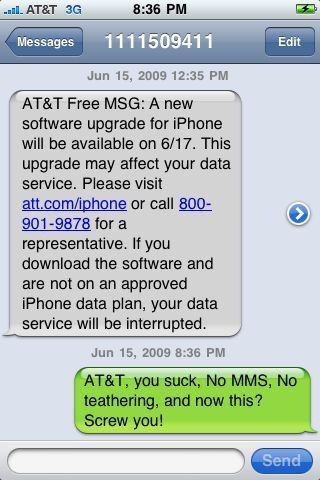
Today I recieved a text message from AT&T to tell me about the 3.0 update on Wednesday, well my first reaction was, how the hell do they know that I have an iPhone if I didn’t activate my service on an iPhone (originally), but Mike said that possibly due to my IMEI, they knew I was on an iPhone 3G. Let me tell you a little story.
Well when I updated to 3.0 (7A341) on Tueday morning, everything seemed 100% fine. Activation went through perfectly and sync went great as well.
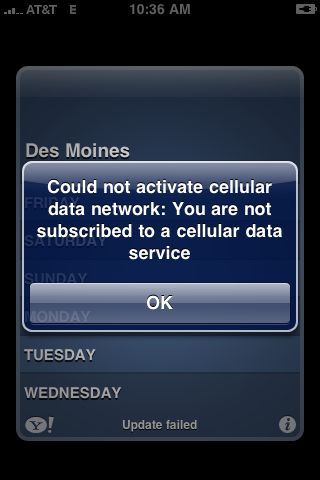
Well, I went to bed and when I woke up Wednesday morning, I decided that I wanted to check my email and weather. So I tried and it gave me an error that read “Could not activate cellular data network: you are not subscribed to a cellular data service”.
Weird huh? Well I though, oh maybe I should reset all network settings, so I did, but to my surprise, it had no effect! So then I decided that maybe Apple had screwed up and accidentally typed in the wrong APN, since the new bundle was AT&T 4.0, instead of the previous AT&T 3.5. So I decided it was time to correct their issue. Little did I know back then that this was 100% intentional. Which AT&T now confirmed was intentional to get prepaid customers to switch to a post paid plan.
My method does not require a jailbreak. I am not jailbroken right now as there will be no public jailbreak until after 3.0 is released to the masses. I made a mobile configuration file for my iPhone 3G in order to change my APN. It is much safer than a custom .ipcc or a manual change. (due to human error of course, and its easier to apply, no iTunes needed to apply it.)
So what you need to do is download a program called “iPhone Configuration Utility”. Its a free download from Apple.com.
There is a very serious issue though. It seems that Apple has not updated their utility so that you can connect an iPhone 3.0 device to it and apply a configuration file directly via USB. You can however email it to yourself and then tap on it on your iPhone to activate and install the new configuration file.
Set the APN to:
APN: wap.cingular
Username: WAP@CINGULARGPRS.COM
Password: CINGULAR1
Now export the .mobileconfig file via an e-mail and email it to yourself. Now go to your Mail application on your iPhone and open the message you mailed yourself, now, tap on the attachment and install the file!
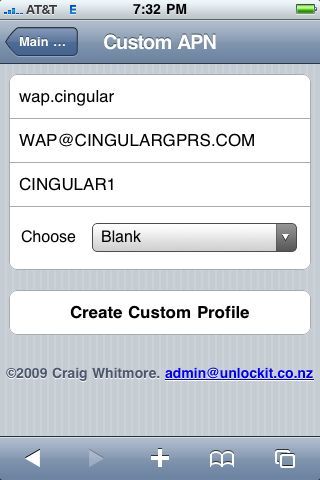
Or, I guess, if you want… you can go to a website and bypass the long installation/creation process explained by my previous method. Just go to
http://www.unlockit.co.nz/#_Custom
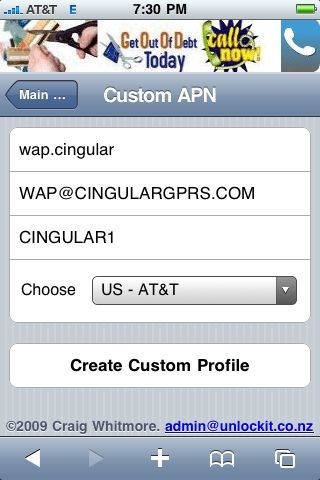
on your iPhone, now just enter the apn data that I provided above where the website indicates. Just copy and paste it in. (or you can tap on the selector, the thing that says “blank”, the thing that is under the APN inputs, and select your carrier.) Now just tap on “create custom profile” and then it will exit Safari, and take you to the settings application. Now just tap on “install” and you are done. (Installing a profile may take up to 30 seconds, do not exit the menu until it is done installing or you will have a very corrupted carrier file.
There you go! Now you have full 3G and EDGE capabilities. This took me about a minute to figure out that it was an issue with the APN information Apple provided in the AT&T 4.0 bundle. So I used a method that I used to use to prevent data usage and just did the opposite and re-enabled data usage.
This is 100% safe! Just make sure you type the APN correctly and you should be fine. Just reboot after you have done this if you still don’t have a connection. I didn’t need to reboot, but you know, just in case. Don’t forget to spread te word and tell everybody you know that has a GoPhone Prepaid iPhone so that they can have uninterrupted service.
287 Comments so far ↓
There are no comments yet...Kick things off by filling out the form below.