
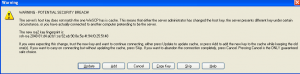
You may also need to take these steps if you get the message: Warning – Potential security breach!
Windows Users:
WinSCP Portable executable
Look for the file “winscp418.ini” located in you WinSCP directory.
Find [SshHostKeys].
Then look for the line that starts with rsa2@22:then has your current iPhone IP Address.
Delete that line and save.
Now try to log in again and accept the new key. You can follow the directions here: WINSCP GUIDE FOR IPHONE
WinSCP Installation package
BE VERY CAREFUL. READ AND REREAD BEFORE YOU DO ANYTHING. MESSING WITH THE REGISTRY CAN SCREW UP YOUR COMPUTER IF YOU DO SOMETHING WRONG
Click Start
Click Run
Type regedit and then hit return
Navigate to: [HKEY_CURRENT_USER\Software\Martin Prikryl\WinSCP 2\SshHostKeys]
Delete only the line that says: rsa2@22:your iPhone’s iP Address
Now try to log in again and accept the new key. You can follow the directions here: WINSCP GUIDE FOR IPHONE
Mac users having trouble with SSH:
Launch Terminal and type “open /Users/username/.ssh/known_hosts”
Then look for the line which has your current iPhone IP Address along with ssh-rsa and ends in “==”
Delete that line and save the file.
Now try to log in again and accept the new key.
i have the connection problem. i followed the direction you posted. but i can’t find “SshHostKeys”. i can only find [HKEY_CURRENT_USER\Software\Martin Prikryl\WinSCP 2]. can you please help me? i’m using vista. thank you very much
I had a connection problem with WinSCP, but realized I had the file protocol set as SFTP instead of SCP. changing this enabled me to connect to the phone.
RE: “alice // Apr 1, 2009 at 3:16 am
i have the connection problem. i followed the direction you posted. but i can’t find “SshHostKeysâ€. i can only find [HKEY_CURRENT_USER\Software\Martin Prikryl\WinSCP 2]. can you please help me? i’m using vista. thank you very much”
I have the exact same issue. Does anyone know how to remove the key in vista?? I have vista 64-bit????
Sam it should still be there click on WinSCP 2
also have you guys been able to connect before?
sorry it wasn’t there cause i was able to connect before and it just turned out to be my sh*t house LINKSYS ROUTER which needs to be power cycled all the time to get my home network to find all the connected devices properly.
im having the same problem that folder is not in the registry im on win xp winscp 4.19
Having the same problem, can’t find the SSHhostKeys folder. Not sure why.
Same problem here. running 421 on Vista. Can’t find the ini or the folder. iphone has power, but won’t connect.
I have windows 7 There is no sshhotkeys file pls help
Unknowingly i have not installed SSH in my iphone
and i have connected winscp ip address to iphone and i have lost all of my data,utilities,settings,contacts and all other applications in iphone….but in winscp root document i have all my data. Can anybody tell how to backup the data to iphone? plzz help me…
Keep getting network error. connection refused. Openssh enabled, winscp on pc enabled thru firewall, win 7, 32 bit. Pita
I have the exact same issue. Ever figure it out?
I am having the same problem as Chris and Dave. Network Error; Connection Refused. I have been using WinSCP and never had an issue. Now all of a sudden, I can no longer log in. Please help!!!
i’m follow all the step to use winscp but i still cannot login to winscp to transfer fail from my window to my iphone 4( jailbreaked to v. 5.01 )
every time i’m login ….access denied….. what can i do for this???? thankyou very much…….